
Confidence scoring
Every forecast carries a confidence score from 0 to 100 percent. It is calculated at the moment the structure is detected, from the quality and completeness of that structure. It is the one figure that lets you compare setups across unrelated markets.
Where you see it
The score sits in the Confidence column of the Live Forecasts feed, with the direction shown directly below it.
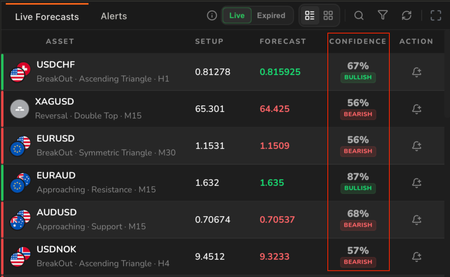
Confidence scores as they appear on the feed, with direction below each score.
The score itself is not colour coded. The green or red you see belongs to the direction badge underneath it, so a green badge means bullish, not high confidence. A high scoring bearish forecast shows a red badge.
Reading the bands
Radar 61 groups confidence into three bands, and these are the same groupings you filter by.
| Band | Score | What it describes |
|---|---|---|
| High | 80% and above | A clean, complete, strongly formed structure. The highest scoring setups on the feed. |
| Medium | 60% to 79% | A well formed structure that meets qualification standards. |
| Low | Below 60% | A qualifying structure at the lower end of the range. |
The bands describe the structure the score was calculated from. They are not instructions about what to do with a forecast.
There is no fixed minimum. Forecasts are published across the range, and it is up to you to decide which levels are worth your attention.
Filtering the feed
The filter control in the widget header opens a panel covering date discovered, markets, symbols, timeframes, trading method, and confidence.

Caption: The confidence filter in the Live Forecasts filter panel.
This matters because the feed is not ordered by confidence. Position in the list tells you nothing about score, so you cannot read the top of the feed as the strongest setups. If you want to work by conviction, filter rather than scroll.
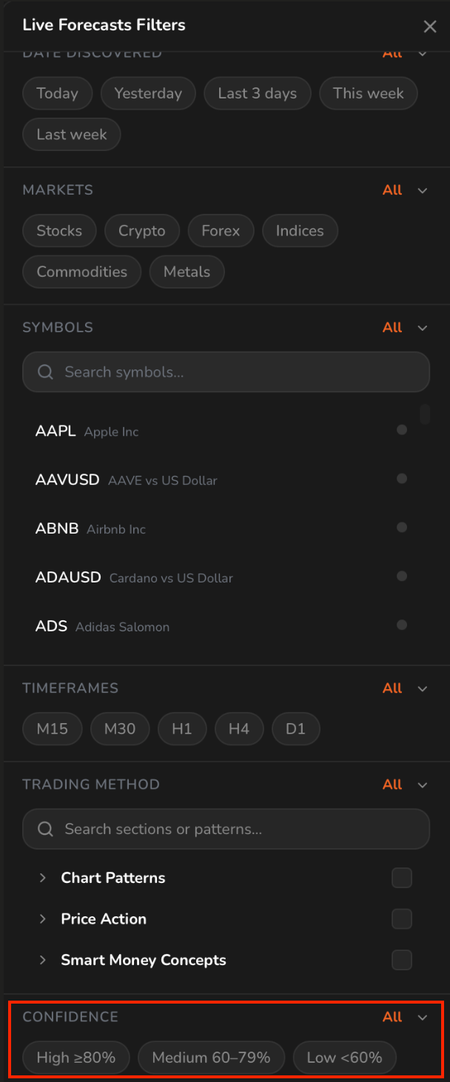
The full Live Forecasts filter panel.
Filtering alerts by confidence
Alerts use a slider rather than bands, so you can set any minimum you like.

The Confidence Level slider in the Create Alert dialog, set to 85% or above.
The slider starts at 0% or above, which lets everything through. Raise it to cut the feed down to the conviction level you actually want to be interrupted for. See Alerts.
Example
Two forecasts appear on the feed at the same time.
- EURSEK, BreakOut, Ascending Triangle, H4, at 85%
- BTCETH, Approaching, Resistance, M30, at 59%
The scores tell you that the EURSEK structure is cleaner and more complete than the BTCETH one, and nothing more than that. They do not say EURSEK is more likely to be profitable, that BTCETH should be ignored, or that either will reach its target.
They also describe different situations. The EURSEK structure has already broken out, while the BTCETH one is still approaching its level. A score is only comparable alongside the category and timeframe it came with.
This is an illustrative example, not live Radar 61 data.
What the score is not
A high confidence score describes structural quality. It is not a probability of profit, and it is not a statement about what the market will do next.
The score reflects how well the detected structure matched the pattern it was measured against, at the moment it was detected. Position sizing, risk, and the decision to act remain yours.
FAQ
Does a higher score mean a better trade? No. It means a cleaner structure. Everything else about the trade, including timing, context, and risk, sits outside the score.
Is there a minimum score for a forecast to appear? No. Forecasts are published across the range. Use the confidence filter to set your own threshold.
Why do two forecasts on the same instrument have different scores? Because they are different structures. The same instrument can carry separate forecasts on different timeframes, each scored on its own.
Can I see only high confidence forecasts? Yes. Use the confidence filter on the feed, or the Confidence Level slider when creating an alert.
Related
- Reading a Forecast. Where the confidence score sits on a forecast, and what the other fields mean.
- Alerts. Filtering alerts by confidence level.
- Catalogue widget. The patterns that confidence scores are calculated from.