
Economic Calendar Widget
The Economic Calendar lists the macroeconomic releases that move markets, so you can see what is scheduled before it hits your positions.
Adding it to a workspace
Click Widget in the top bar and pick Economic Calendar, or choose Open Widget Store to add several widgets at once.
Reading the calendar
Events are grouped by day, with a count of scheduled releases beside each date. Within a day they run in time order.
 A day of events. Each row carries its time, currency, event, impact, forecast, and previous figure.
| Column | What it shows |
|---|---|
| Time | When the release is due, in your selected timezone |
| Cur | The currency the release affects |
| Event | The name of the release |
| Imp | How much market movement the release is expected to cause |
| Fcst | What the market expects the figure to be |
| Prev | The figure from the previous period |
A dash in the forecast column means no forecast has been published for that release. You will still see the previous figure.
Events with no economic figure attached, such as bank holidays, carry a different icon and show no forecast or previous values. They matter because thin liquidity around a holiday changes how markets behave.
xpanding a row shows the release in full:
| Field | What it shows |
|---|---|
| Currency | The currency affected |
| Impact | High, Medium, or Low |
| Status | Whether the release has happened yet |
| Release (local) | The full date and time, with timezone |
| Forecast | The expected figure |
| Previous | The figure from the previous period |
A Full history on ForexFactory link opens that event's past results, so you can see how it has printed against expectations over time.
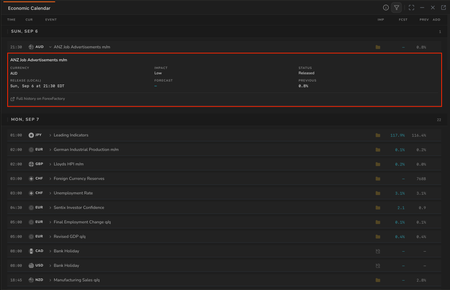 An expanded event, showing its full detail and the link to past results.
Impact
The folder icon in the Imp column shows the expected impact of a release:
| Colour | Impact |
|---|---|
| Red | High |
| Orange | Medium |
| Yellow | Low |
High impact releases are the ones most likely to move price sharply. If you hold a position in a currency with a red release due, it is worth knowing before it lands rather than after.
Filtering
The filter icon in the widget header opens three groups of filters.
Time sets the window: This Week, Last 3 Days, Yesterday, Today, or Tomorrow. These are relative windows rather than a date picker, so the calendar stays current without you adjusting it.
Impact is a set of checkboxes for High, Medium, and Low, plus Bank Holidays as a separate option. Turning off Low and Medium leaves only the releases most likely to move price sharply.
Currencies covers USD, EUR, GBP, JPY, AUD, NZD, CAD, CHF, and CNY. Select the ones you trade and the rest drop out of the list. Clear resets the selection.
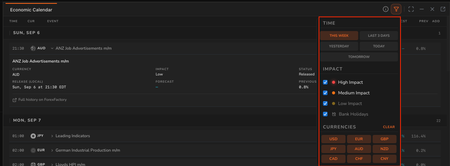 The filter panel, with time window, impact, and currency filters.
Filters combine, so selecting High Impact with USD and EUR gives you only the major releases for those two currencies.
Timezone
Event times follow the timezone set for your account, which you can change from the status bar at the bottom of the workspace or in Settings > Preferences. The same setting controls timestamps across the platform, so changing it here changes forecast times too.
Important notes
Forecast figures are market expectations, not Radar 61 forecasts. The Fcst column is what analysts expect a release to show. It has nothing to do with the forecast targets on the Live Forecasts feed, which are price projections from detected structures. The two are unrelated despite sharing a word.
A scheduled release is not a prediction of direction. The calendar tells you when volatility is likely, not which way price will go.
Event data comes from ForexFactory. Radar 61 displays the schedule and figures; the underlying calendar is maintained elsewhere. Each event links out to its full history.
Related
- Live Forecasts widget. Detected setups, which a major release can invalidate quickly.
- Market Clocks widget. Which sessions are open, which affects how a release is absorbed.